Showing posts with label ink cartridges. Show all posts
Showing posts with label ink cartridges. Show all posts
Tuesday, March 10, 2009
Wednesday, February 18, 2009
Friday, February 6, 2009
Canon i560 service error 5c00

This worked a treat for Canon i560
Waste Ink Counter Reset.
(1) Turn off the printer.
(2) Press and hold the RESUME button, then press and hold the POWER button.
(3) Release the RESUME button, Next press and release the RESUME button two(2) more times in succession. Note: you are still holding the POWER button). The printer's carriage will “reset" or move momentarily.
If the above was properly performed the printer will enter the "Service Mode".
(4) Press the RESUME button 4 times, this will select the clear waste ink counter function. The lamp will alternate (change) color with each key press. Next press the POWER button to "set" the change, and return to the top of the function selection menu. Press the POWER button again to restart the printer.
Wednesday, February 4, 2009
Refill kit for Canon inkjet
refil ink or Refill Canon Inkjet is very easy for the one who know the prosedure, but if we Don't know the method , don't try because the mechine can break.
Try the method in the video, hope it help you.
Try the method in the video, hope it help you.
Saturday, January 31, 2009
Resetter Epson Stylus Photo R230, R220 and R270,
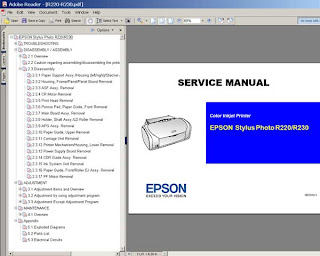
Download Service Manual Epson R230 and R220
Before run adjustment program or software resetter Epson Stylus Photo R220 and R230, set date setting in your computer to 12 January 2006. Appearance of adjustment program Epson stylus photo R220 and R230 like adjustment program for Epson C45. Your Epson Stylus Photo R220 and R230 must be installed correctly in your computer before using the software otherwise so this software resetter will not be used.
Here how to use the software
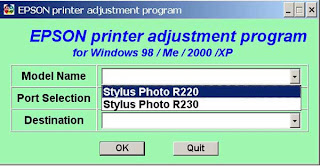
* Download and extract downloaded software and run it.
* Click accept button.
* Set model name, port selection and destination setting and equal
to your printer.
* Click Maintenance Tab.
* Check mark waste ink pad counter.
* And the clear the protection counter (reset counter to zero)
* Then click Ok, Ok
* done
=> adjusment program Epson R220 - R230
=> adjusment program Epson R270
Download manual service
and any way if epson r230 blinking you can use SSC
klik at => SSC 4.3 and there are tutorial and how to use it.
How to use the SSC Service Utility
Please to be Patient and if any one want something else please give me comment down here Ok
thanks guys 4 all comment

Before run adjustment program or software resetter Epson Stylus Photo R220 and R230, set date setting in your computer to 12 January 2006. Appearance of adjustment program Epson stylus photo R220 and R230 like adjustment program for Epson C45. Your Epson Stylus Photo R220 and R230 must be installed correctly in your computer before using the software otherwise so this software resetter will not be used.
Here how to use the software

* Download and extract downloaded software and run it.
* Click accept button.
* Set model name, port selection and destination setting and equal
to your printer.
* Click Maintenance Tab.
* Check mark waste ink pad counter.
* And the clear the protection counter (reset counter to zero)
* Then click Ok, Ok
* done
=> adjusment program Epson R220 - R230
=> adjusment program Epson R270
Download manual service
and any way if epson r230 blinking you can use SSC
klik at => SSC 4.3 and there are tutorial and how to use it.
How to use the SSC Service Utility
Please to be Patient and if any one want something else please give me comment down here Ok
thanks guys 4 all comment
Thursday, January 29, 2009
Epson C110, CX7300, CX8300 & CX9300 Printer
please download these resetter below free ( you only have for post in quest book )
Epson CX9300F Adjustment
Epson CX8300 Adjustment
Epson C110 Adjustment
Epson CX7300 Adjustment
Epson CX9300F Adjustment
Epson CX8300 Adjustment
Epson C110 Adjustment
Epson CX7300 Adjustment
Subscribe to:
Posts (Atom)